
3.9 KiB
Benchmarks
vtebench
All benchmarks are done using vtebench:
./target/release/vtebench -b ./benchmarks
2021-06-25
System
CPU: i9-9900
RAM: 64GB
Graphics: Radeon RX 5500XT
Terminal configuration
Geometry: 2040x1884
Font: Fantasque Sans Mono 10.00pt/23px
Scrollback: 10000 lines
Results
| Benchmark (times in ms) | Foot (GCC+PGO) 1.8.0 | Foot 1.8.0 | Alacritty 0.8.0 | URxvt 9.26 | XTerm 368 |
|---|---|---|---|---|---|
| cursor motion | 12.93 | 15.37 | 26.47 | 23.41 | 1304.00 |
| dense cells | 39.16 | 47.19 | 87.26 | 9110.00 | 10883.00 |
| light cells | 5.34 | 6.42 | 12.76 | 16.00 | 60.00 |
| scrollling | 144.26 | 139.93 | 133.98 | 117.52 | 3772.67 |
| scrolling bottom region | 130.81 | 125.34 | 116.10 | 117.31 | 3574.67 |
| scrolling bottom small region | 142.46 | 127.52 | 127.32 | 135.18 | 3572.67 |
| scrolling fullscreen | 5.43 | 5.27 | 12.06 | 11.97 | 118.62 |
| scrolling top region | 129.05 | 120.24 | 121.65 | 341.70 | 3567.33 |
| scrolling top small region | 121.59 | 109.82 | 137.03 | 219.96 | 3558.67 |
| unicode | 12.03 | 11.95 | 13.94 | 667.67 | 4905.67 |
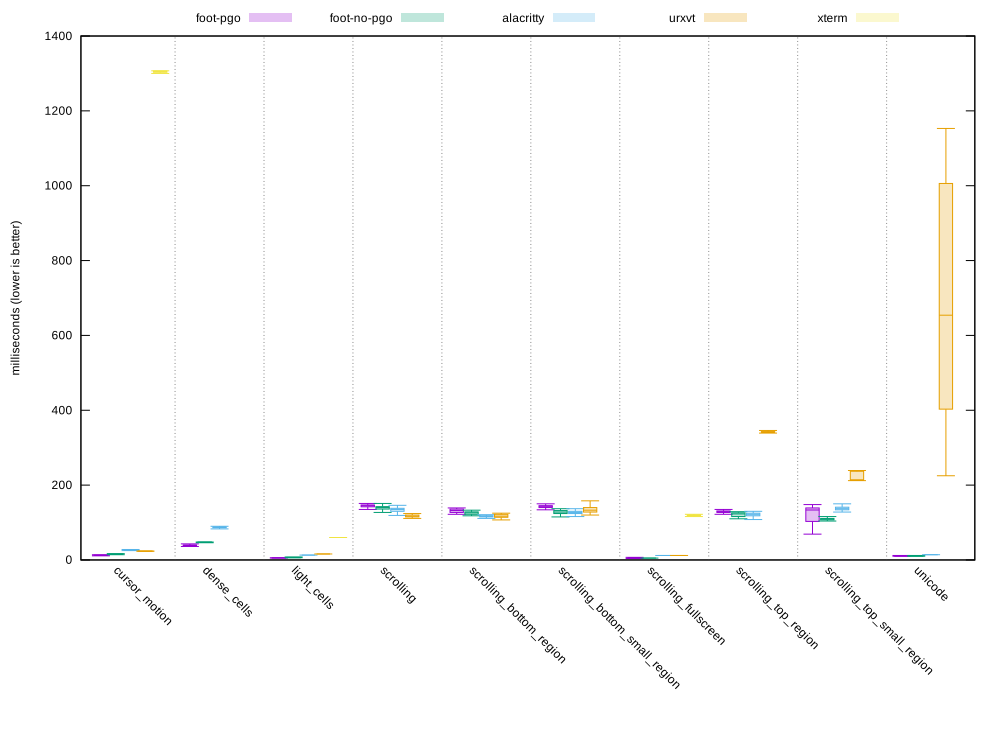
2021-03-20
System
CPU: i5-8250U
RAM: 8GB
Graphics: Intel UHD Graphics 620
Terminal configuration
Geometry: 945x1020
Font: Dina:pixelsize=12
Scrollback=10000 lines
Results
| Benchmark | Foot (GCC+PGO) 1.7.0.r2 | Foot (no PGO) 1.7.0.r2 | Alacritty 0.7.2 | URxvt 9.22 | St 0.8.4 | XTerm 366 |
|---|---|---|---|---|---|---|
| alt-random | 0.714s ±0.047 | 0.900s ±0.041 | 1.586s ±0.045 | 1.684s ±0.034 | 2.054s ±0.121 | 37.205s ±0.252 |
| alt-random-colors | 0.736s ±0.054 | 0.950s ±0.082 | 1.565s ±0.043 | 2.150s ±0.137 | 2.195s ±0.154 | 33.112s ±0.167 |
| scrolling | 1.593s ±0.070 | 1.559s ±0.055 | 1.517s ±0.079 | 1.462s ±0.052 | 3.308s ±0.133 | 134.432s ±0.436 |
| scrolling-filled-lines | 1.178s ±0.044 | 1.309s ±0.045 | 2.281s ±0.086 | 2.044s ±0.060 | 2.732s ±0.056 | 20.753s ±0.067 |
| unicode-random | 0.349s ±0.009 | 0.352s ±0.007 | 0.148s ±0.010 1 | 19.090s ±0.363 | crashed | 15.579s ±0.093 |
Alacritty and "unicode-random"
Alacritty is actually really slow at rendering this (whether it is fallback fonts in general, emojis, or something else, I don't know).
I believe the reason it finishes the benchmark so quickly is because it reads from the PTY in a separate thread, into a larger receive buffer which is then consumed by the main thread. This allows the client program to write its output much faster since it is no longer stalling on a blocked PTY.
This means Alacritty only needs to render a couple of frames since it can reach the final VT state almost immediately.
On the other hand, cat:ing the unicode-random test file in an
endless loop, or just manually scrolling up after the benchmark is
done is slow, which besides being felt (input lag), can be seen by
setting debug.render_timer = true in alacritty.yml.